Let the browser safely receive only the Nacos JSON configs you allow

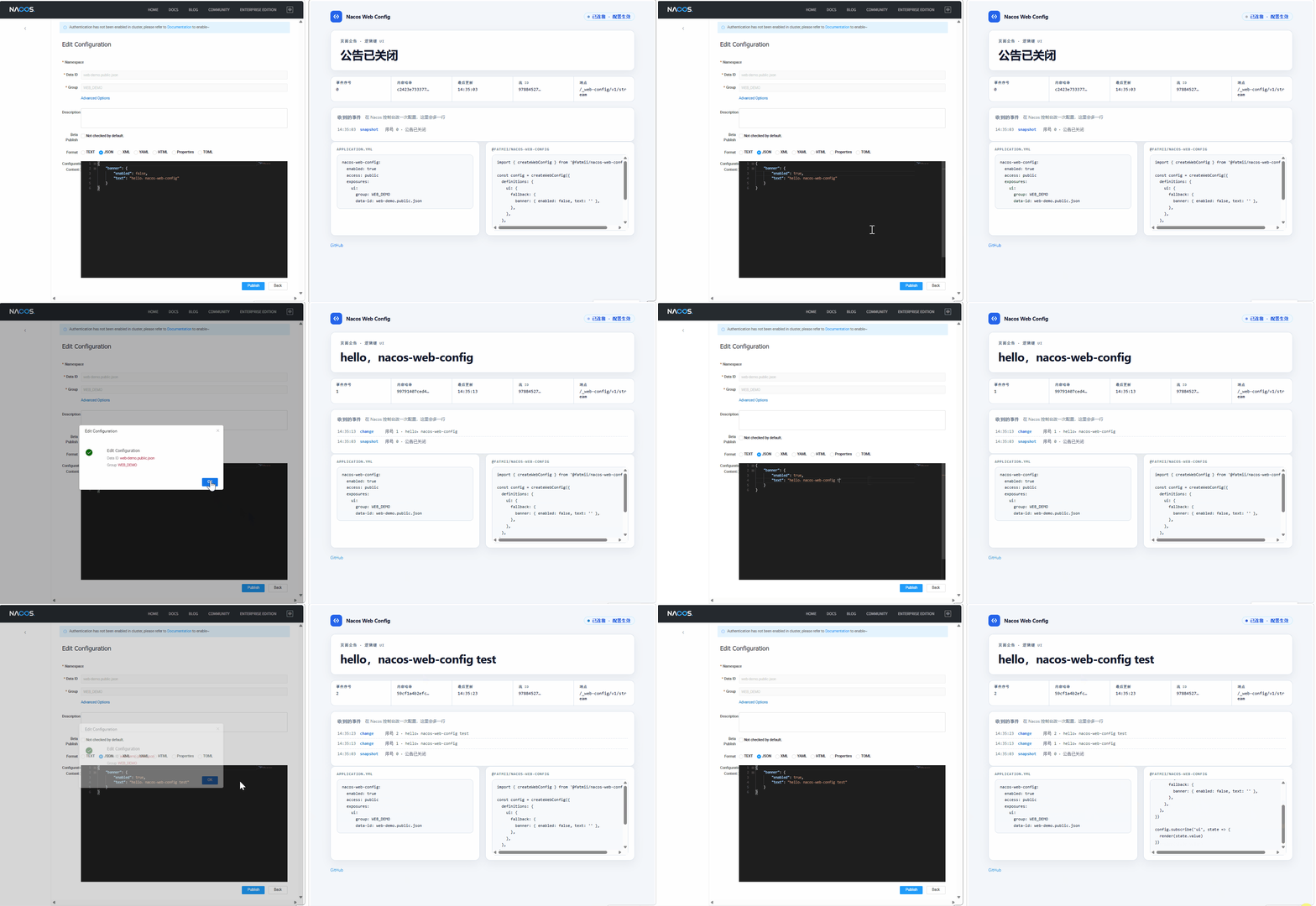
Live recording: after publishing in Nacos, the page updates without a reload
Live recording: publish in the Nacos console, and the page updates over same-origin SSE. Click to enlarge.

Why you need it

Banners, feature flags, and campaign copy often live in Nacos.

Ops wants the live page to change as soon as they publish—not after the next frontend release.

But the page should not talk to Nacos itself.

So let your Spring Boot app talk to Nacos, and let the page talk only to your app. You list which names the page may see; the backend checks them and pushes updates.

ScenarioHomegrown / direct accessnacos-web-config
Where credentials liveEasy to put in the frontend; a stolen account can change or delete configsCredentials stay on the backend
How much you can openNacos authorizes by namespace; you cannot open just one configOnly the names you list
Exposure of NacosOpening it to the public risks taking the config center downThe page talks only to your backend
Ops publishes bad JSONRules are yours; the page often breaksDrop bad data; keep the last good value
Show updates soon after publishKeep polling, or build push yourselfBackend pushes changes
Nacos is briefly downYou invent the behaviorValues on the page are not cleared
Integration costCache, protocol, testsDependency + YAML + subscribe()

How data flows

No extra process, database, or admin console. Install it on the Spring Boot app that serves browsers. Click nodes and zoom; open the full interactive page anytime.

Open the full architecture diagram

nacos-web-config:
  enabled: true          # off unless explicitly enabled
  access: public        # required: public | authenticated
  nacos:
    server-addr: 127.0.0.1:8848
  exposures:              # whitelist: logical key → fixed Nacos coordinates
    ui:
      group: WEB_DEMO
      data-id: web-demo.public.json
      max-bytes: 65536
  • YAML
  • Whitelist

Authorization lives in YAML

What may leave the server is decided by the whitelist: each logical key maps to fixed Nacos coordinates plus a byte cap. Login and auth stay with the host security chain. The starter does not invent its own.

Quick start

Add the starter and whitelist on the backend, subscribe on the frontend. Full options are in the GitHub README “Configuration reference”.

  1. Step 1

    Backend: add the starter and declare the whitelist

    <dependency>
      <groupId>io.github.fatmii.nacoswebconfig</groupId>
      <artifactId>nacos-web-config-spring-boot-starter</artifactId>
      <version>0.1.0</version>
    </dependency>
    nacos-web-config:
      enabled: true
      access: public
      nacos:
        server-addr: 127.0.0.1:8848
      exposures:
        ui:
          group: WEB_DEMO
          data-id: web-demo.public.json
          max-bytes: 65536

    This exposes the SSE endpoint at /_web-config/v1/stream (override with path). Choose access: public (anyone who reaches the endpoint may read the whitelist) or authenticated (a stream opens only when the request already has a signed-in identity).

  2. Step 2

    Frontend: subscribe

    $ npm install @fatmii/nacos-web-config
    import { createWebConfig } from '@fatmii/nacos-web-config'
    
    // endpoint defaults to /_web-config/v1/stream; decode is optional
    const config = createWebConfig({
      definitions: {
        ui: { fallback: { announcement: '' } },
      },
    })
    
    const unsubscribe = config.subscribe('ui', state => {
      renderAnnouncement(state.value?.announcement ?? '')
    })
    // config.get('ui') reads current state; the shared connection opens on the first subscribe()
  3. Step 3

    Local demo

    # Needs JDK 17, Maven, and Docker that can run linux/amd64
    $ cd dev-environment
    $ docker compose --project-name nacos-web-config-local up -d nacos2
    # wait until http://127.0.0.1:18848/nacos responds
    
    $ cd ..\java
    $ $env:NACOS_SERVER_ADDR='127.0.0.1:18848'
    $ mvn -pl examples/spring-mvc -am spring-boot:run

    Open http://127.0.0.1:8080/, publish web-demo.public.json under group WEB_DEMO in Nacos (e.g. {"announcement":"hello"}). The page should update within a few seconds. More detail: java/examples/spring-mvc/ and dev-environment/ in the repo.

Compatibility

DependencyVersionNotes
Java17+Spring Boot 3.x, servlet/MVC
Nacos client2.5.3single supported client line
Nacos server2.5.3full chain verified (Java tests + browser E2E)
Nacos server3.2.3Adapter tested; full browser path not claimed yet
Browsersmodernfetch + ReadableStream; no EventSource fallback

FAQ

Does Nacos get exposed to the frontend?

No. The browser only talks to a same-origin SSE endpoint on your own backend and can only reach logical keys explicitly declared in the YAML whitelist. The Nacos address, credentials, group / dataId / namespace never pass through the browser.

Why can't the browser talk to Nacos directly?

A password in JS is visible to anyone, and a Nacos account can change configs. Nacos also cannot expose “only this one config” to a page. Opening it to the public risks taking the config center down. Let your backend talk to Nacos. The page talks only to your backend, and only gets the configs you allowed beforehand.

Why SSE instead of polling or WebSocket?

This is one-way config push. SSE is ordinary HTTP: same-origin, reuses your auth and gateways, cheap in the browser. The protocol carries monotonic sequence numbers and a stream ID; snapshots precede deltas; out-of-order events are rejected; reconnects refetch a snapshot. Polling cannot do that. WebSocket leaves you to build it.

Why not just expose one plain endpoint and poll it?

A homegrown polling API still leaves you to own auth, whitelist mapping, bad-data handling, push, and reconnect behavior. This project packages those: only named configs reach the page, bad data does not break the UI, and publishes push over SSE. Integration is a dependency, YAML, and subscribe().

How does authentication work?

access is public or authenticated, and must be set or startup fails. public: anyone who reaches the endpoint may read the whitelist (read-only). authenticated: a stream opens only when the request already has a principal. The starter checks getUserPrincipal(); it does not log anyone in. With no login wiring, every call is 401. The level is per stream, not per key.

What if ops publishes a broken config?

Content is hard-validated: it must be a JSON object within max-bytes. Non-conforming content is rejected and never overwrites the last known good value. If Nacos as a whole is unreachable, data is merely marked stale and pages keep rendering the last valid config.

What are the limitations?
  • Nacos 3.2.3: adapter tested; full browser path not claimed yet.
  • Servlet MVC only; no WebFlux.
  • Values must be JSON objects under max-bytes.
  • ESM-only SDK; older browsers need your own bundler/polyfill.
  • No admin UI; create and edit configs in the Nacos console.
Is there a full configuration reference?

Yes. The README “Configuration reference” is a full YAML sample with defaults and inline comments for every field. One principle: any invalid value fails startup with a precise message—nothing is silently defaulted.

Does exposing several configs mean several connections?

No. The whole whitelist of one backend instance shares a single connection: the browser puts every subscribed key on one request (32 keys per connection by default), the first snapshot carries all of them, and later each changed key is pushed individually. An instance serves exactly one namespace; spanning namespaces means another instance.

Adding a new exposed config — does that mean rebuilding and redeploying?

No business-code change: add one allowed entry in application.yml and restart. Add the same name under frontend definitions. Fields that change often can live in one JSON object, so ops edits go live without adding more public entries.

Does the frontend require a specific framework?

No framework lock-in. The SDK is a TypeScript library with a plain subscribe / get model—use it from React, Vue, or vanilla pages. It requires a modern browser with fetch + ReadableStream support.

More detail: GitHub README

Actively shipping
v0.1.0

First public release

Spring Boot starter + browser SDK are on Maven Central and npm.

The page only gets whitelisted JSON.

When ops publish in Nacos, same-origin SSE pushes to the browser.

Get it

0.1.0 is on Maven Central and npm. Add a dependency or run npm install.

npm Published

npm install @fatmii/nacos-web-config, version 0.1.0 — TypeScript ESM, no runtime dependencies.

View package

Build from source

With JDK 17+, Maven and Node.js: run mvn verify under java/, and npm ci && npm test && npm run build under browser/.

Build instructions

You can also build from GitHub source. Please do not file public issues for vulnerabilities — see SECURITY.md.